Enhance your Searching with Google Suggest
If you have read my post on CustumizeGoogle a few months ago, you will have notice that the addition of Google suggest when you are searching would be of great help, especially if you use Google.com more that any other website in a day.
Just at the end of last month, Google had 'graduated' Google Suggest from its Lab so that now Google users would be able to apply this feature. As you write you search terms, the Google Suggest would give you relevant suggestions that you may find useful.
Here is one shot I took to give you a better idea of what I am talking about.
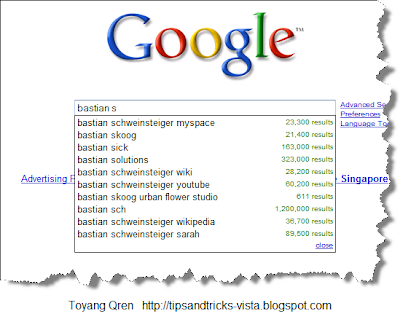
According to the
Google blog, this feature would help in reducing spelling errors, save keystrokes and help in formulating queries.
Personally, this feature help me when I am looking for a terms which I am not sure how to spell. Just a week ago, I was looking for some video of Germany and Bayer Munich player, Bastian Sch%^Personally, this feature help me when I am looking for a terms which I am not sure how to spell. Just a week ago, I was looking for some video of Germany and Bayer Munich player, Bastian Sch%^$&*#(%, and this Google suggest really helped me to find it easier and faster. By the way, now I can spell the name correctly, thanks to Google Suggest too. The player is one of my favorite, Bastian Schweinsteiger.
amp;*#(%, and this Google suggest really helped me to find it easier and faster. By the way, now I can spell the name correctly, thanks to Google Suggest too. The player is one of my favorite, Bastian Schweinsteiger.
If you are wondering how to disable this feature, you can read my other post about
disabling Google Suggest.Hope this helps.
 Hope this helps.


